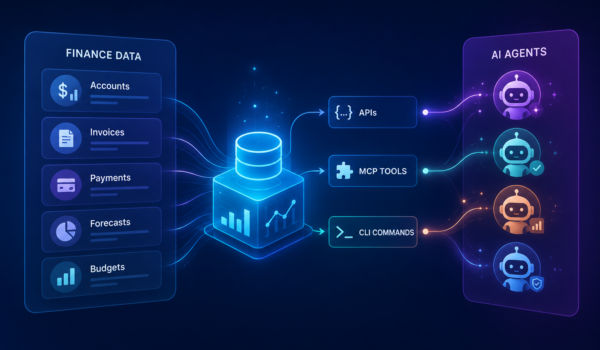
Salesforce just turned its entire platform into an API that AI agents can act on—without a browser. For admins evaluating what it changes about their org’s architecture, and the finance partners they support, the answer comes down to one question: where does your accounting data actually live? Here’s what “headless” really changes.
Share
Salesforce admins and solutions architects have a new architectural question on their desk: when Salesforce makes its entire platform headless, what actually changes about the systems integrated into the org? The technical write-ups answer the engineering side. The vendor demos showcase the agents. The bigger question—what it changes for the accounting system bolted to the platform, and for the finance partners who depend on that data—is mostly going unanswered.
The pressure underneath it is well documented. IT teams spend roughly 36% of their time designing, building, and testing custom integrations, and 71% of IT leaders say their infrastructure makes systems overly dependent on one another, according to the MuleSoft 2026 Connectivity Benchmark Report. When Salesforce makes every capability on its platform addressable as an API, an MCP tool, or a CLI command, integration burdens don’t go away. They sharpen. A headless platform exposes everything that lives on it. It doesn’t reach what doesn’t.
This article is for the admin or architect looking at Salesforce going headless and asking what it actually changes about the accounting system in their stack—and what to take to their finance team next.
What “Salesforce headless” actually means
Salesforce going headless means the platform is no longer something a person must log into through a browser to use. Every capability—reading a customer record, posting a journal entry, triggering an approval, querying a report—is now exposed as an API, a Model Context Protocol (MCP) tool, or a command-line instruction. AI agents and external applications can act on the platform directly, without ever opening a UI.
In plain language: the body of Salesforce is separated from the head. The “head” is the screen a salesperson, controller, or service rep clicks through. The “body” is the data, the workflows, the security model, and the business logic. Headless exposes the body. Anything that can be done in the head can now be done by an agent talking to the body.
MCP—Model Context Protocol—is the standard that lets coding agents like Claude Code, Cursor, and similar tools connect securely to a Salesforce org and act on live data. It’s the plumbing that makes “an AI agent does the work” something more than a demo.
What changes for the systems integrated with your Salesforce org
The headless platform is built for agents to do work. Some of that work is exactly the kind of cross-system question your finance team brings to you in tickets and Slack threads.
An agent operating on a headless Salesforce can answer “which deals that closed last quarter haven’t been invoiced yet?” with a single query. It can flag a customer whose payment behavior has shifted before a human spots it in an aging report. It can pull together a draft month-end variance commentary, with the source transactions linked. None of this requires finance to learn an agent platform, and none of it requires you to write custom integration code. It requires the data the agent needs to be reachable through the headless layer in the first place.
Here’s where the value of the headline becomes unequal. A headless platform only exposes the data on the platform. If a piece of financial information lives somewhere else—in QuickBooks, NetSuite, or Sage Intacct—the agent has to stop, hand off to another connector, or guess. The headless era is already here for orgs whose accounting data lives on Salesforce. For everyone else, the headline is mostly about somebody else’s stack—and a reminder of the connector you’re still maintaining.
Headless only helps if your financial data is on the platform
This is where the architecture matters more than the demo, and it’s the part worth bringing to your finance team.
Only 23% of organizations have all their financial data in a single system, according to Accounting Seed’s State of AI in Accounting: 2026 Industry Survey. Another 20% have their data spread across multiple disconnected systems—and the majority sit somewhere in between, with most data in one place and pieces strewn across connected tools. The finance impact of that fragmentation is concrete: the same survey found 84% of finance teams spend at least 25% of their time on manual, repetitive tasks, and roughly a third spend more than half their time that way.
The trust gap follows the data gap. A BlackLine survey of 1,300+ finance professionals found that 37% of CFOs don’t fully trust their own financial data, with 31% citing “data from too many sources” as the primary reason. AI doesn’t fix a broken data foundation. It magnifies it. An agent acting confidently on stale or fragmented data produces stale or fragmented work, faster.
The prerequisite for benefiting from a headless platform is a real data foundation—a single source of truth for the data the agent is acting on. Without it, the agent is a more efficient version of the same broken workflow. With it, every layer Salesforce just exposed becomes useful at once.
Native accounting vs. bolt-on accounting in the headless era
The native vs. bolt-on argument isn’t new. The headless platform sharpens it.
A Salesforce-native accounting system runs on the Salesforce Platform itself. CRM data and financial data share the same database, the same security model, and the same user interface. When Salesforce exposes the platform as APIs and MCP tools, financial data is part of what gets exposed—automatically, under the same governance as the rest of the org.
A bolt-on accounting system is a separate product with its own database, its own API, and its own security model. It’s connected to Salesforce through middleware—Celigo, Boomi, MuleSoft, DBSync, Breadwinner, or a vendor-built connector. Headless on Salesforce doesn’t reach the bolt-on system. To get an agent to see your financial data, you need a second integration to the second system, with its own access rules, sync delays, and maintenance burden.
Here’s how the major accounting options—three common bolt-on systems and the native alternative—compare in the headless era:
A headless Salesforce only has access to data in Salesforce. NetSuite still requires its own integration layer for an agent to see financial transactions, with its own API rate limits and sync schedule.
QuickBooks Online
MuleSoft Composer, Breadwinner, DBSync, or similar connectors
The QuickBooks API lacks unique identifiers for clean record matching. An agent reading “the latest invoice for this customer” can end up reading from stale or duplicated data.
Sage Intacct
Sage Intacct Advanced CRM Connector on the Salesforce AppExchange
Two databases, separately governed. Field mapping can break when either vendor releases an update. A headless layer on Salesforce stops at the connector boundary.
Accounting Seed
Built natively on the Salesforce Platform—same database, same security model, same UI as your CRM
Financial data is already part of what the headless layer exposes. AI agents reach it under your existing Salesforce governance, with no connector to maintain.
The point isn’t that bolt-on systems are bad accounting software. It’s that “Salesforce is now headless” is an architectural statement about the Salesforce Platform—and the architecture only delivers value to the data that lives on that platform. The alternative to a better connector isn’t a smarter agent. It’s eliminating the need for the connector entirely.
For finance teams, that means the value of the headless era is mostly determined before the first agent is ever turned on—by where your accounting data sits in the first place.
3 questions to bring to your finance team before assuming headless helps
Before turning agents loose on financial workflows—or signing off on the platform direction—pose these three questions to your financial team. Admins are usually the ones who notice the architecture problems first; finance leaders are usually the ones who feel them last and hardest.
1. Where does your financial data actually live? Map it honestly. Sales data and customer data in Salesforce. Bills, invoices, journal entries, GL accounts—where? If those answers are different systems, the agent can only reach what’s on Salesforce. The others require a connector that may or may not keep up.
2. Is your accounting system governed by Salesforce’s security model, or by its own? When an AI agent acts on financial data, the access rules matter as much as the data itself. Salesforce-native accounting inherits Salesforce’s permissions, audit trail, and field-level security—the same model you have previously established in the org. Bolt-on accounting runs under whatever permission framework its vendor built, separately, and not always consistently with how you’ve governed the rest of the data.
3. When an agent acts on your financial data, what is the system of record—and how stale is the sync? Every bolt-on integration introduces sync delays. A headless platform doesn’t eliminate them. If an agent posts a payment based on a CRM record that’s three hours ahead of the accounting system, the resulting transaction can be wrong before anyone notices.
The honest answer to all three questions points in the same direction: the more your financial data already lives on Salesforce, the more value the headless platform delivers—both to the finance team and to the admin who has to keep the architecture together.
Why the headless era favors Salesforce-native finance stacks
The opening question—what does Salesforce going headless actually change about the accounting system in your org—has an architectural answer underneath it. The agent stories that get demoed live on platforms where the data is already unified. The agent stories that struggle in practice live across systems that don’t communicate with each other. The admins maintaining those second systems already know which version they’re in.
Accounting Seed is accounting software built natively on the Salesforce Platform. CRM data and financial data sit in the same database, under the same security model, accessible through the same headless layer Salesforce exposes. No connector, no middleware, no sync delay. The AI agents already running on top of Accounting Seed—a Collections Agent for AR, a Bill Pay Agent for AP, a General Ledger Agent for transaction querying and research—operate on financial data inside that single source of truth, without a second integration layer for an admin to maintain. We’ve covered what that looks like in detail for one piece of the work in our guide to AI in accounts receivable.
The headless era doesn’t change what finance teams need from their accounting software, or what admins need from their org’s architecture. It changes which architectures can actually deliver both. Most of what’s possible in this new era is only achievable if your accounting data and your CRM are already Salesforce-native.
Frequently asked questions about Salesforce headless
What does Salesforce headless mean?
Salesforce headless means every capability on the Salesforce Platform—reading data, updating records, running workflows, triggering approvals—is accessible as an API, an MCP tool, or a CLI command, so AI agents and external applications can operate the platform without a browser or a user interface. The “head” (the UI a person clicks through) is separated from the “body” (the data, workflows, and security model). Anything a user can do in Salesforce can now be done by an agent talking directly to the platform.
What does Salesforce headless mean for accounting and finance teams?
It means any financial data that lives on the Salesforce Platform is directly addressable by AI agents under Salesforce’s security model. If your accounting system runs natively on Salesforce, agents can read transactions, post entries, and act on financial workflows without a connector. If your accounting system lives outside Salesforce—in QuickBooks, NetSuite, or Sage Intacct—the headless platform doesn’t reach it, and the agent still depends on whatever middleware connects the two systems.
Does Salesforce headless work with NetSuite, QuickBooks, or Sage Intacct?
Not directly. Salesforce’s headless platform exposes the Salesforce Platform—its data, workflows, and security model. NetSuite, QuickBooks, and Sage Intacct are separate systems with their own databases and APIs. An AI agent acting on Salesforce can read what’s on Salesforce. To act on data inside a bolt-on accounting system, you still need a middleware integration (Celigo, Boomi, MuleSoft, Breadwinner, or a vendor-specific connector), with its own sync delays, access rules, and maintenance burden.
What’s the difference between Salesforce headless and Agentforce?
Salesforce headless and Agentforce work together but solve different problems. Agentforce is Salesforce’s AI agent platform—the agents themselves, the orchestration, and the lifecycle management around them. Salesforce headless is the access layer underneath: every capability on the platform exposed as an API, an MCP tool, or a CLI command. Agentforce agents use the headless layer to act on the platform, and third-party agents (Claude Code, Cursor, custom-built agents) can use the same layer to act on your Salesforce data under your security model.
What do finance teams need to do to be ready for Salesforce headless?
Start with where your financial data lives. AI agents can only act on data that is reachable through the headless layer, and only 23% of organizations have all their financial data in a single system. The work is less about adopting new agent tools and more about getting your data foundation right—consolidating sales and financial data on one platform so an agent has a single source of truth to act on. Accounting software built natively on Salesforce, like Accounting Seed, removes that consolidation step by design.
About the author
Jesse Bronson
Jesse is the Director of GTM Growth at Accounting Seed. He collaborates with finance professionals and industry experts to develop practical content for companies evaluating accounting technology. He works with subject matter experts to ensure technical accuracy while making complex accounting concepts accessible and actionable for finance teams at growth-stage organizations.
See Accounting Seed in action
See how accounting on Salesforce can eliminate the need for costly integrations—and silos of mismatched information—by sharing the same database as your CRM.