Top 14 Bill Pay Software Programs for SMBs
Compare the top bill pay software for SMBs, including tools for invoice capture, approvals, payments, and AP automation. See key features, best fits, and limitations.


Compare the top bill pay software for SMBs, including tools for invoice capture, approvals, payments, and AP automation. See key features, best fits, and limitations.
Managing bills sounds simple until your business starts growing. Then the volume picks up and invoices arrive in different formats. The steps to code, route, and pay each one start piling up. Finance teams jump between tools, spend extra time re-checking entries, and sort through scattered updates just to keep payments moving. When information is split across systems, planning cash needs gets harder and vendor activity is tougher to track.
Automating AP solves for this by pulling bills into one place, guiding approvals through a clear workflow, and connecting payment activity directly to the ledger. And when invoices, approvals, and payments live inside the same system that already holds customer and financial data, teams don’t have to retype information or chase missing details. They can move faster, avoid common errors, and stay on top of upcoming obligations with less effort.
Here we take a closer look at what small and midsize businesses should consider when choosing bill pay software and highlight the top tools in the space. Each solution is reviewed by its core features, who it’s built for, and where it may be limited so you can assess the right fit for your needs.
Bill pay systems fall into two main categories based on where the work happens and how data moves. Understanding the difference helps clarify what each approach requires from your team.
Bolt-on bill pay tools operate separately from the accounting platform. Teams upload invoices into one system, approve them there, and process payments there, then rely on syncs to send everything back to the general ledger. This setup can work, but it introduces extra steps, extra logins, and more reconciliation work. Delays in syncing or mismatched records are common because the accounting system and bill pay tool maintain different copies of the same information.
Embedded bill pay is built inside the accounting platform itself. Invoice capture, approvals, vendor records, payments, and reconciliation all take place in one environment. Because everything shares the same database, coding and reporting stay aligned without waiting for syncs or importing data from another system. For Salesforce users, native and embedded tools also use the same workflow engine and security model the rest of the organization already relies on.
Running your operations on Salesforce? You can manage bills, approvals, and payments in the same system your teams already work in. Jump to Accounting Seed ↓
A reliable bill pay system should support the flow of AP work from invoice receipt to payment and reconciliation. The features below outline the areas that matter most when evaluating how a tool fits into your day-to-day process.
The system should pull key details from invoices—vendor names, dates, amounts, and line items—and improve accuracy over time through learning-based predictions.
Approvals should follow rules based on department, amount, or project. The system should track who approved what and keep the entire history in one place.
Vendors use different payment types. The best solutions offer the ability to pay by ACH, check, virtual cards, or other options without extra administrative work.
A bill pay tool should give a clear view of pending totals, due dates, and the timing of payments so teams can plan spending with confidence.
Role-based access, duplicate detection, and a full record of changes help maintain accuracy and support internal reviews.
Payments should match to bank activity automatically so month-end work is lighter and requires less manual cleanup.
For teams running operations on Salesforce, native accounting and bill pay keeps all sales and financial data in one system without relying on connectors.
With those criteria in mind, the tools below are grouped by how they deliver bill pay functionality. We start with accounting platforms that include AP features out of the box, then move to standalone automation tools that plug into existing systems. From there, we cover spend management platforms that bundle bill pay with cards and expense controls, followed by lighter invoicing tools suited for very small operations. Finally, we look at Salesforce-native options for teams that want AP and accounting inside the same CRM environment they already use.
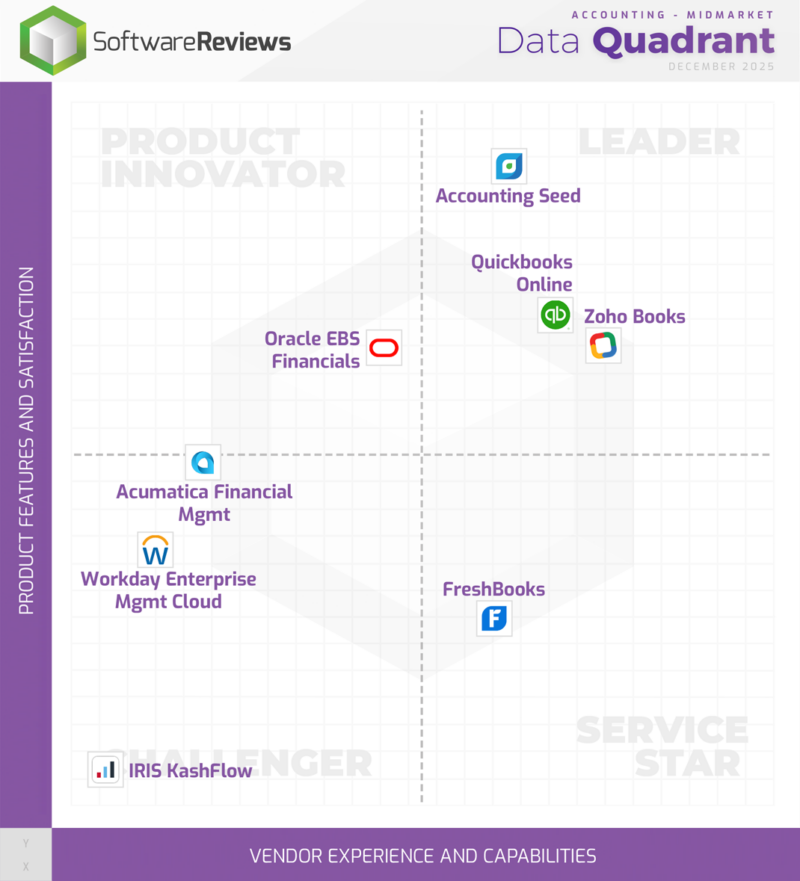
QuickBooks Online includes bill creation, document uploads, due-date tracking, and vendor management within the accounting system. Bills can be entered manually or pulled in through connected inbox tools that read key fields automatically. Users can route bills for review, schedule payments by ACH, debit card, or mailed check, and sync all activity directly to the general ledger. The mobile app supports approving bills, viewing vendor activity, and monitoring upcoming payments. Reporting updates as bills move through the workflow, giving clearer visibility into open payables and cash commitments.
Best for: Small businesses that already use QuickBooks for bookkeeping and want AP activity connected to their accounting records. Organizations using solutions like Salesforce or HubSpot should know that linking QuickBooks to those platforms will require middleware or third-party connectors.
Limitations: Users note that payments don’t always apply automatically to invoices, creating extra steps to match records. Some reviews mention weak syncing between QuickBooks Payments and QuickBooks Online, especially when transferring invoice details. The system can also feel rigid for refund handling, with partial refunds requiring a full reversal.
Xero Bills lets businesses upload invoices, capture details automatically with Hubdoc, assign coding, and route bills for approval. Payment execution happens through a bank upload file or connected payment partners, depending on the plan. Users can batch bills, track expected cash outflows, and view approval status in real time. Vendor records, account coding, and document backups are stored inside Xero, which helps during month-end close and audits. Multi-currency and bulk payment features are available on higher tiers. The mobile app allows users to review bills and attach documents on the go.
Best for: Teams already using Xero that need bill tracking and light automation without adopting a standalone AP solution.
Limitations: Users report weak OCR accuracy, limited scheduling options such as the inability to set a future process date, and sync issues when accounting periods are locked. Some note that attached documents don’t always sync correctly, bank feed matching can be inconsistent, and more complex books can break the integration.
Sage Intacct’s accounts payable automation is built directly into its core accounting platform. AP workflows include AI-assisted invoice capture, draft bill creation, purchase order matching, approval routing, due-date tracking, and payment processing. Invoices can be uploaded or emailed in, with Sage AI extracting vendor details, amounts, dates, and line items to pre-populate bills for review. The system flags potential duplicates and supports soft closes through auto-matched transactions.
Payments can be issued by check, ACH, or virtual card, with payment status, posting details, and audit trails tracked centrally. All AP activity—bills, approvals, payments, reconciliation, and reporting—lives in the same system as the general ledger.
Best for: Organizations already using Sage Intacct that want AP automation tightly integrated with their general ledger, purchasing, and reporting. It’s a strong fit for finance teams managing multiple entities or high invoice volume who want AI-assisted data capture and centralized auditability without adding a separate AP tool.
Limitations: Users report difficulty correcting AP invoices once they’ve been paid, limited automated fund balancing, and posting issues that can create complex due-to/due-from combinations. Some note sync problems when closing periods, rigid reporting structures tied to account groups, and AP workflows that become cumbersome without careful setup. Teams that rely heavily on external platforms like Salesforce or HubSpot should plan for integrations, which may require middleware.
NetSuite’s AP module includes invoice capture, vendor onboarding, PO matching, approval routing, and multi-currency payments. Users can set rules for coding, link bills to projects or departments, and pay vendors through integrated banking tools or SuiteApps. Because AP sits inside the ERP, teams can connect payables to purchasing, budgeting, and reporting without extra software. The solution stores documents, historical approvals, and vendor details in one record, which helps during audits or reviews.
Best for: Mid-market and enterprise companies that want AP closely connected to procurement, reporting, and other ERP activity. Teams that also use platforms like Salesforce or HubSpot should be aware that linking NetSuite to those systems typically requires middleware or custom integrations.
Limitations: Reviews mention that setup for accounting workflows can be slow and heavily dependent on configuration, making certain AP tasks harder without expert help. Some users describe outdated UI elements, awkward list-view navigation for large vendor lists, and system slowdowns when many custom fields or scripts are added. Complex books require careful configuration to avoid issues.
On Salesforce and want bill pay in the same platform as your customer and financial data? Skip ahead to Accounting Seed ↓
These tools emphasize invoice capture, approvals, and payments. They plug into accounting systems and often provide deeper AP automation than built-in accounting modules.
BILL offers invoice capture, coding, approvals, and vendor payments in one solution. Users can upload invoices or send them to a BILL inbox where data is read automatically. Bills can move through multi-step approvals, then be paid by ACH, card, or mailed check. BILL syncs with QuickBooks, Xero, Sage, and NetSuite to reduce manual entry and keep the GL updated. The mobile app supports reviewing bills, approving payments, and checking vendor history. International wires are available. BILL includes vendor records, document storage, and audit history.
Best for: SMBs wanting a mature AP automation tool that plugs into existing accounting software without requiring a wider finance solution.
Limitations: Reviews mention sync issues with QuickBooks Online and limited reporting flexibility. While BILL is strong for AP, some users say the Accounts Receivable (AR) side is very basic—especially compared to the payables workflow—so teams that want deeper invoicing, templates, and automation may end up doing more manual work or keeping AR in their accounting system. Some users also note configuration challenges with integrations like NetSuite, recurring invoice updates that must be changed one by one, invoice-number reuse, rigid invoice templates, and occasional problems connecting vendors to e-payment options.
Melio supports invoice uploads, automated data extraction, approval workflows, and payments by ACH, debit card, credit card, check, or wire. Users can sync activity with QuickBooks or Xero and track vendor information directly within the tool. Payment methods and processing speeds depend on the plan level, and some features—such as international or expedited payments—may incur fees. Mobile access allows reviewing bills and checking payment status. Reporting is basic but sufficient for small business needs.
Best for: Small businesses that want flexible payment options with simple AP workflows at a lower entry cost.
Limitations: Reviews mention occasional payment delays, limited support for international wires and currencies, risk of high card-payment fees, and vendor record duplication when syncing with QuickBooks. Some users report missing security controls around vendor bank-detail changes, basic reporting options, and inconsistent acceptance of payments for certain customers or transactions.
Tipalti provides invoice capture, tax form collection, global vendor onboarding, approval routing, and payments across many currencies and methods. Its portal lets vendors submit information, W-9/W-8 forms, and banking details, helping reduce manual follow-up. Users can configure rules for coding, routing, and payment timing. Tipalti integrates with ERPs such as NetSuite and accounting tools like QuickBooks and Xero. It also provides audit logs and fraud checks. Setup is more involved than lightweight tools, but its global and compliance capabilities are extensive.
Best for: Companies working with international suppliers or contractors that need tax, compliance, and multi-currency payout tools.
Limitations: Reviews mention slow navigation when switching between procurement and bills, limited OCR handling for invoices without PO numbers, and missing notifications for receipts. Some users cite weak Sage integration, no remittance options, required payee resubmission of documents for simple updates, invoice images failing to load, and approval audit trails spread across multiple modules.
Stampli focuses on invoice collaboration and workflow control. Its AI captures invoice details, identifies coding suggestions, and creates a single communication thread for questions tied to each bill. Teams can assign reviewers, set routing rules, and pay vendors through Stampli Direct Pay or ERP-integrated payment options. The solution integrates with 70+ ERPs and provides vendor management, document storage, and dashboards. Mobile access supports approvals and invoice review.
Best for: Mid-market organizations that want stronger invoice collaboration and workflow management without adopting a new ERP.
Limitations: Some users note limited control over GL account access, slow or inconsistent search, and missing invoice-view functions such as printing, copying, or page indicators. Others mention occasional trouble retrieving invoice images, ad-hoc reporting that’s hard to reuse, higher pricing for certain add-ons, and navigation that can feel slow during busy periods.
These systems combine bill pay with expense management, corporate cards, and spend limits. They work best when used as part of the larger suite.
Ramp Bill Pay uses OCR and AI to extract invoice details, code bills, and route approvals. Payments can be sent via ACH, card, check, or wire. The tool connects AP to Ramp’s spend controls, vendor alerts, and corporate card program, giving teams a single view of both employee and vendor spending. Integrations support syncing to ERPs and accounting software. Users can monitor vendor totals, budgets, and upcoming payments from Ramp dashboards.
Best for: SMBs and startups that use Ramp for cards or want card-based spend and AP housed in one system.
Limitations: Some users note Ramp can be expensive compared with alternatives, and roles can feel limited for admins who also hold other responsibilities. A few reviews mention missing multi-role functionality, occasional fraud-related card issues, and a desire for faster in-app communication options.
Brex Bill Pay supports invoice uploads, AI-powered data capture, coding, multi-step approvals, and payments through ACH, card, check, or wire. AP ties into Brex’s spend management, reimbursements, and card controls. Vendor onboarding, visibility into category spending, and consolidated reporting all live in one solution. ERP integrations allow syncing to accounting software. The mobile app supports approvals, vendor lookups, and reviewing spend.
Best for: Fast-growing teams that already use Brex cards or want AP, reimbursements, and card programs connected under one umbrella.
Limitations: Some users report unexpected account closures or restrictions, which can disrupt payment flow. Others highlight that advanced approval-workflow features and detailed reporting are locked behind higher-tier plans, limiting full functionality for smaller teams. Credit limits tied to cash flow can fluctuate, which may complicate budgeting for businesses with variable revenue.
Rippling Bill Pay reads invoices using AI, applies coding rules, and routes bills through a policy engine. Payments can be made by ACH, check, or wire. Because Rippling ties AP to HR, payroll, and spend management, approval paths can consider roles, departments, or headcount data. Vendor records, audit trails, and payment timing all sync directly to Rippling’s general ledger module. Dashboards show spending by team, cost center, or period, and mobile access supports quick approvals.
Best for: Startups that want AP, cards, expenses, and payroll connected in the same system.
Limitations: Some reviews mention sudden account closures and feature restrictions affecting workflows. Others note fluctuating credit limits tied to cash flow, limited approval-routing logic without a paid plan, gated advanced reporting, and small UI glitches during payment creation. A few users report that recurring expenses require re-entering details.
If Salesforce is your core system, you can handle invoice capture, approvals, and payments without leaving it. Go to Accounting Seed ↓
These tools focus on customer billing and basic vendor tracking. They’re useful for very small operations that don’t need full AP automation.
Square Invoices centers on customer billing but can support light bill tracking when combined with Square’s financial tools. Users can upload documents, track due dates, store vendor details, and access all activity from the mobile app. Payments are primarily focused on AR, but vendor payments can be handled through linked Square checking features. Reporting covers cash activity and open invoices.
Best for: Small businesses already using Square for payments that want lightweight bill organization without adopting a dedicated AP tool.
Limitations: Users mention limited invoice customization, few layout or branding options, and difficulties adding discounts or custom fields. Transaction fees can feel high for large invoices, and recurring invoices or multi-version templates are not flexible. Some reviews note restricted cross-currency payment support and occasional delays in accessing deposited funds.
Zoho Books is a full accounting platform that includes built-in accounts payable features for managing bills, vendors, and payments in one system. Users can capture and track vendor bills, create purchase orders, automate recurring expenses, and pay vendors via bank transfer or check. Bills can be matched to bank transactions, categorized automatically, and tied back to inventory or projects when needed. Audit trails, approval workflows (on higher plans), and mobile access support day-to-day bill management alongside general ledger, inventory, and reporting.
Best for: Small businesses that want bill pay and AP tracking as part of a broader accounting system, rather than a standalone AP tool.
Limitations: Reviews commonly mention a few friction points: the interface can feel less intuitive in places (some users say you have to “dig” to find what you need), and tasks like invoice/template customization can be confusing. Several reviewers also call out integration gaps with certain third-party tools (for example, payment processors or industry software), which can add manual work. On the AP/accounting side, some note that bank feeds and reconciliation can be clunky at higher transaction volumes (including bank-feed timing delays).
Many organizations use Salesforce to run sales, service, and operations but rely on separate accounting tools for financial work. Salesforce-native accounting platforms remove that divide by keeping bill pay, AP workflows, vendor data, and financial activity inside the same system. Because everything uses Salesforce records and automation, bills, approvals, and payments move through one data model rather than being pushed between multiple solutions. This keeps information consistent and reduces the extra work that comes from maintaining connectors or managing duplicate vendor and invoice records.
Accounting Seed delivers AP automation and bill pay directly within the Salesforce environment. Invoice data, vendor records, approvals, and payment activity all share the same database as the general ledger. AI Invoice Capture reads PDFs, images, and spreadsheets and predicts GL accounts, product codes, and project mappings based on past entries. Invoices sent by email can automatically create payable records, keeping documents and coding together from the start.
Payment Proposals let teams search for payables, group bills, apply credit memos, and send batches for approval with an updated running total. Payment Services supports ACH, virtual cards, and checks based on each vendor’s preferred method. Once payments are approved, the system creates and applies disbursements and updates reconciliation without extra steps. Because the entire process runs on Salesforce, workflow rules, reporting, security, and approvals follow the same structure already used across the organization.
The platform also includes a Bill Pay AI Agent that helps teams manage upcoming payments with more confidence. It reviews due dates, discount opportunities, and past activity to highlight which bills should move first, and it flags possible duplicates before they reach the payment stage. Users can ask plain-language questions about what needs attention, which payables qualify for early-payment savings, or where potential issues may exist. This keeps billing activity organized and reduces the back-and-forth usually required to prepare each payment cycle.
Best for: Growing small-to-midsize businesses on Salesforce with expanding invoice volume and AP needs with increasing complexity.
Limitations: Accounting Seed requires a Salesforce environment, which may not suit teams working outside that platform. For organizations already operating or planning to operate on Salesforce—the most widely adopted CRM—the AP and bill-pay setup uses Salesforce objects and workflows.
AP work touches every part of the business, from how fast bills get paid to how accurately cash needs are forecasted. When coding, approvals, and payments live in separate tools, teams lose hours to manual steps and scattered information. Bringing these tasks into one system reduces delays, cuts down on errors, and gives finance teams the visibility they need to stay ahead of rising transaction volume.
A well-built AP setup helps your organization stay organized, pay vendors on time, and keep financial data connected across the board. If you’re ready to see how an embedded approach can lighten the workload and give your team more breathing room, Accounting Seed can walk you through it step by step.
See how accounting on Salesforce can eliminate the need for costly integrations—and silos of mismatched information—by sharing the same database as your CRM.