Accounting software for Controllers

Close with confidence. Keep control of the details.

Reduce the manual work behind month-end. Accounting Seed connects transactions, reconciliation, and reporting in one system, so your team spends more time reviewing the numbers and less time rebuilding them.

Keep month-end moving

Make reconciliation a smaller part of your close

Keep routine matching from taking over month-end. Bank Direct Connect downloads transactions from supported banks and matches them to accounting records using your configured matching settings.

Transactions that need attention stay visible for your team to review. Investigate possible matches, fill in missing details, and work through exceptions in one place. You spend less time comparing lines in spreadsheets and more time resolving the differences that matter.

Make each step count

A stronger process from entry to close

Give your team a connected way to process transactions, review balances, and complete the period.

Reduce repeat data entry

Create billings from sales opportunities and automate recurring transactions. Keep customer and accounting information connected to reduce manual handoffs and rekeying.

Control period-end activity

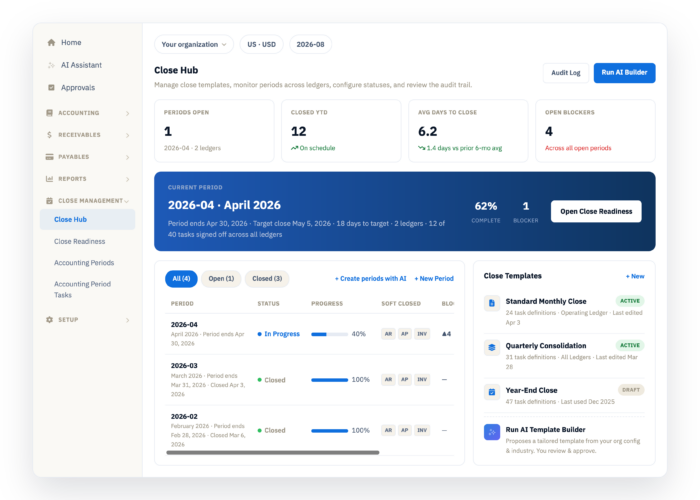
Soft-close selected subledgers as work is completed, then hard-close the accounting period to restrict further posting and unposting.

Find the transactions that need attention

Use the General Ledger Agent to find unposted entries and research transaction details. Drill into the supporting records to investigate balances and keep close work moving.

Review with confidence

Make your controls part of the workflow

Chat with the AI Assistant to find answers in your accounting data. Pre-built skills help investigate differences between AR/AP aging and general ledger balances before close.

Keep review built into the process with permissions, payment-proposal approvals, and period controls. Your team can work through exceptions and complete the close with access governed by Salesforce.

What used to take two days using Excel takes two hours in Accounting Seed for bank reconciliations.

Marina Peterson Downtown Streets Team

Book a demo

Frequently asked questions

What controllers want to know

How does Accounting Seed support a continuous close?

Keep close work moving throughout the month with automated accounting workflows and a close checklist that highlights outstanding tasks and blocked items. Your team can track progress, resolve exceptions, and use period controls to complete the close.

Can my team review bank transactions that do not match?

Yes. Unmatched transactions are collected in a dedicated view. Your team can review potential matches, complete missing information, and decide how each transaction should be handled.

What controls can we put around accounting activity?

Use Salesforce permissions and configurable approval processes to support your team's responsibilities. Soft closes restrict activity in selected subledgers; a hard close restricts posting and unposting across the accounting period.

How can we investigate a balance or support a review?

Entity-level financial reports let you follow linked amounts into ledger and transaction detail. Bank reconciliation reports also help your team review cleared transactions and differences, making it easier to explain the numbers.

Can we use our preferred AI tools for accounting work?

Yes. Hosted MCP connects compatible tools such as ChatGPT or Claude to live Accounting Seed data. Your team can ask for an aging summary, research account activity, or prepare a payment proposal from the AI tool it already uses. Actions follow the authenticated user’s Salesforce permissions and are recorded in an audit trail.

Book a demo

See how to simplify your month-end close

Walk through the reconciliation, reporting, and controls that can help your team close with confidence.

Book a demo